


Mib2 CarPlay / Android auto activation script + lifetime map license / EU conversion
Price range: £109.99 through £139.99
MIB2 CarPlay / Android Auto Activation Script – Unlock Smart Connectivity + Lifetime Maps
Upgrade your vehicle’s infotainment experience with the MIB2 CarPlay / Android Auto Activation Script, designed to unlock powerful smartphone integration directly within compatible MIB2 infotainment systems.
This activation solution enables Apple CarPlay and Android Auto, allowing seamless connection between your smartphone and your vehicle’s display. Once activated, drivers gain access to essential smartphone features such as navigation, music streaming, calls, messaging, and apps, all controlled safely from the car’s infotainment interface.
In addition to smartphone connectivity, the script also enables a lifetime navigation map license, ensuring your system remains updated with the latest maps, routes, and points of interest (still need to have map files which are not included in this product!).
Whether you’re navigating daily commutes or long road trips, this activation upgrade enhances convenience, connectivity, and driving comfort.
Key Features
Apple CarPlay Activation
- Connect your iPhone directly to the MIB2 system
- Access Apple Maps, calls, messages, music, and supported apps
- Control everything through the vehicle display for safer driving
- Voice commands available through Siri integration
Android Auto Activation
- Seamlessly connect Android smartphones
- Use Google Maps, music apps, messaging, and phone functions
- Access compatible Android apps directly from the infotainment screen
- Voice control support with Google Assistant
Lifetime Navigation Map License
- Enables permanent map update capability
- Access the latest navigation maps and POIs
- Improved route planning and accurate navigation
- No recurring map license costs
Quick and Simple Activation
- Straightforward installation process
- Step-by-step instructions included
- Unlock features within minutes
- Designed for MIB2 infotainment platforms
Wide Firmware Compatibility
Supports many firmware versions including MHI2 and MHI2Q series across multiple regions such as:
- Europe
- USA
- Japan
- China
- Taiwan
- RoW systems (manual script adjustment may be required)
Supported Regions
- Europe
- USA
- Japan
- China
- Taiwan
- Rest of World (custom script adjustment required)
Supported Firmware Versions
⚠️ IMPORTANT:
This activation script works ONLY with the firmware versions listed below.
If your system is running a different firmware, you must update your MIB2 unit before using the script.
MHI2 Firmware
- MHI2_CN_AU276_P1214_MU1214
MHI2_CN_AU276_P1215_MU1215
MHI2_CN_AU37x_P0916_MU0916
MHI2_CN_AU57x_K1006_MU1005
MHI2_CN_AU57x_P0623_MU0623
MHI2_CN_AU57x_S0037_1_MU0037
MHI2_CN_AUG22_K0730_MU0729
MHI2_CN_AUG22_P0618_MU0618
MHI2_CN_AUG22_S0038_MU0038
MHI2_CN_AUG22_S0039_MU0039 - MHI2_ER_AU276_P3621_MU0876
MHI2_ER_AU276_P5088_MU1325
MHI2_ER_AU276_P5154_MU1325
MHI2_ER_AU276_P5502_MU1460
MHI2_ER_AU276_P5506_MU1466
MHI2_ER_AU276_P5509_MU1474
MHI2_ER_AU276_P5510_MU1477
MHI2_ER_AU276_P5515_MU1488
MHI2_ER_AU276_P5600_MU1498 - MHI2_ER_AU37x_P3620_MU0875
MHI2_ER_AU37x_P4159_MU1106
MHI2_ER_AU37x_P4203_MU1168
MHI2_ER_AU37x_P5089_MU1326
MHI2_ER_AU37x_P5153_MU1326 - MHI2_ER_AU43x_P5098_MU1339
MHI2_ER_AU43x_P5151_MU1339
MHI2_ER_AU43x_P5402_MU1467
MHI2_ER_AU43x_P5404_MU1479
MHI2_ER_AU43x_P5406_MU1489 - MHI2_ER_AU57x_K2589_MU1429
MHI2_ER_AU57x_K3663_MU1425
MHI2_ER_AU57x_P3236_MU0670
MHI2_ER_AU57x_P3634_MU0910
MHI2_ER_AU57x_S2519_MU0389 - MHI2_ER_AU62x_P5099_MU1340
MHI2_ER_AU62x_P5403_MU1468
MHI2_ER_AU62x_P5407_MU1490 - MHI2_ER_AUG22_K2161_MU1421
MHI2_ER_AUG22_K3344_MU1438
MHI2_ER_AUG22_K3346_MU1438
MHI2_ER_AUG22_P3241_MU0678
MHI2_ER_AUG22_S2148_MU0442 - MHI2_JP_AU43x_P0902_MU0902
MHI2_JP_AU62x_P0701_MU0616
MHI2_JP_AUG22_P0713_MU0713
MHI2_JP_AUG22_S0037_MU0037 - MHI2_KR_AU37x_P0901_MU0818
MHI2_KR_AU43x_S0035_MU0035
MHI2_KR_AU57x_P0901_MU0615
MHI2_KR_AU57x_S0035_MU0035
MHI2_KR_AUG24_S0008_MU0008 - MHI2_TW_AU37x_P0901_MU0816
- MHI2_US_AU276_P5083_MU1312
MHI2_US_AU37x_K5512_1_MU1484
MHI2_US_AU37x_P5107_MU1363
MHI2_US_AU43x_K1083_MU1412
MHI2_US_AU43x_P5124_MU1389
MHI2_US_AU43x_P5180_MU1462 - MHI2_US_AU57x_K3324_1_MU0925
MHI2_US_AU57x_K3341_MU1426 - MHI2_US_AU62x_K2588_MU1407
MHI2_US_AU62x_P5125_MU1390
MHI2_US_AU62x_P5181_MU1463 - MHI2_US_AUG22_K2162_MU1422
MHI2_US_AUG22_K3345_MU1439
MHI2_US_AUG22_K3347_MU1439
MHI2Q Firmware
- MHI2Q_CN_AUG22_K1004_MU1003
MHI2Q_CN_AUG22_P0915_MU0915
MHI2Q_CN_AUG22_P1002_MU1002 - MHI2Q_ER_AUG22_P3638_MU0916
MHI2Q_ER_AUG22_P3638_MU0917
MHI2Q_ER_AUG22_P4170_MU1117
MHI2Q_ER_AUG22_P4212_MU1177
MHI2Q_ER_AUG22_P5092_MU1329
MHI2Q_ER_AUG22_P5152_MU1329 - MHI2Q_JP_AUG22_P1017_MU1017
- MHI2Q_KR_AUG22_P1018_MU1018
- MHI2Q_US_AUG22_P3639_MU0918
MHI2Q_US_AUG22_P4171_MU1118
MHI2Q_US_AUG22_P4213_MU1178
MHI2Q_US_AUG22_P4246_MU1320
MHI2Q_US_AUG22_P5087_MU1316
Compatibility Notice
✔ Only the firmware versions listed above are supported
✔ If your firmware is different, update your MIB2 firmware before installation.
✔ If you are unsure how to check your firmware version, refer to the system information menu in your MIB2 unit,
✔ Make sure you can enter GEM before you place order. How to check? Please take a look on diagram below, section GEM:
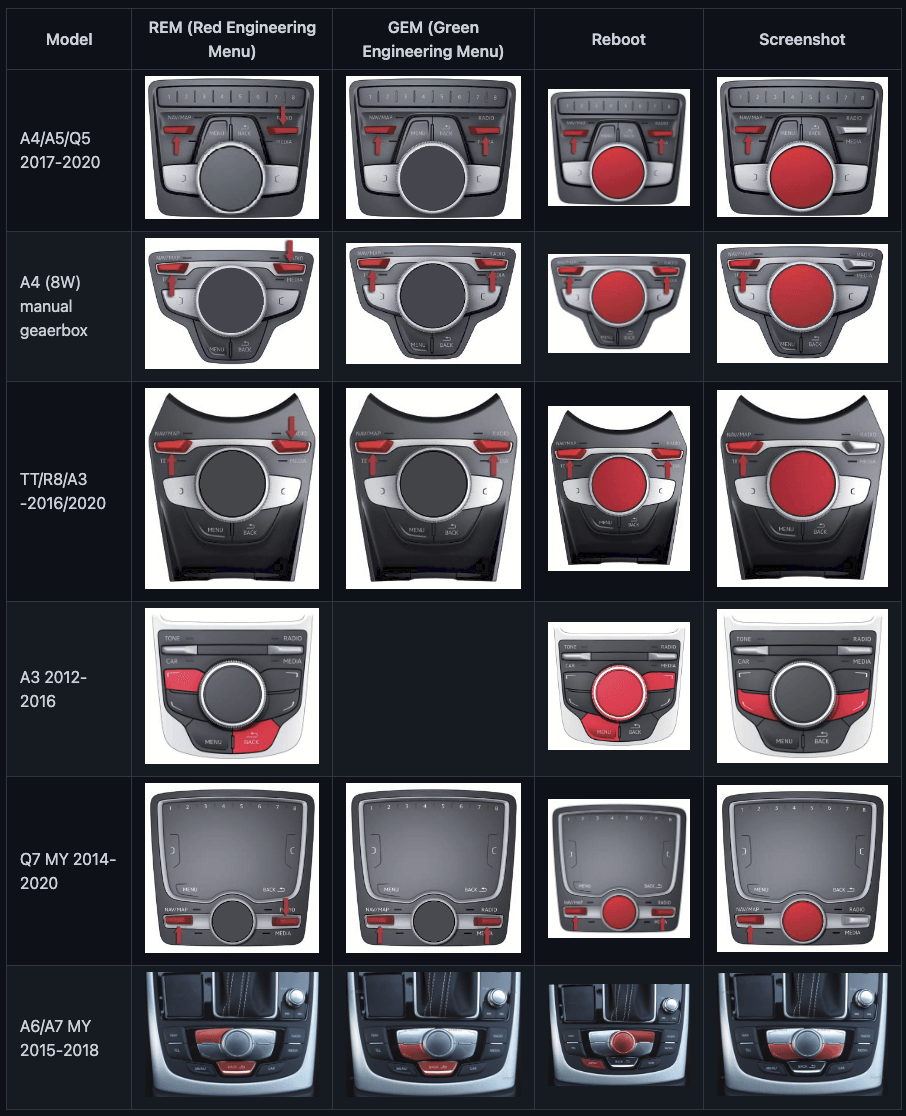
In some cases you might need to have OBDEleven or VCDS to enable developer mode (access to the GEM), how to enable? click here.
If you don’t know how to check your firmware version, please visit this page (click)
Installation Overview
- Verify your current firmware version is supported.
- If required, update the firmware to a compatible version.
- Follow the activation instructions which you can find here (click here).
- Activate CarPlay, Android Auto, and lifetime maps.
Why You Should Buy This Activation Script
✔ Unlock premium smartphone connectivity features
✔ Upgrade your infotainment system without replacing hardware
✔ Gain Apple CarPlay + Android Auto functionality
✔ Enable lifetime navigation map license
✔ Compatible with many MIB2 firmware versions worldwide
✔ Quick installation with provided instructions (can be found here, click here)
This upgrade transforms your factory infotainment system into a fully connected smart driving hub, bringing modern smartphone integration directly to your dashboard.
Lifestyle Benefits
Imagine entering your car and instantly accessing your favorite music playlists, navigation apps, and messages through your vehicle’s screen. With Apple CarPlay and Android Auto activated, your drive becomes more productive, more connected, and safer — allowing you to stay focused on the road while staying digitally connected.
FAQs
How do I check my firmware version?
You can check the firmware version within the MIB2 system engineering menu or system information screen. Click here to check manual.
What happens if my firmware is not supported?
Your unit will need to be updated to a supported firmware version before running the activation script.
Is the activation permanent?
Yes. Once activated, the features remain enabled.
Does this include navigation maps license?
Yes. The activation includes a lifetime map license, allowing future navigation updates. Only map license! No map files.
Is it compatible with all vehicles?
Compatibility depends on the MIB2 unit model and firmware version, not only the vehicle model.
Delivery Options
To make the installation as convenient as possible, we offer two delivery options depending on your preference.
Digital Download (Instant Delivery)
- Receive the activation script via download
- Includes installation instructions
- Delivered immediately after purchase
- Perfect for users who want to activate their system right away
Recommended for users familiar with SD card preparation and installation process.
Preloaded SD Card (Physical Shipping)
- Activation script preloaded on an SD card
- Ready to use — simply insert the card into your MIB2 system, still need to follow installation instructions (click here)
- No need to prepare files yourself
- Ideal for users who prefer a plug-and-play solution
Physical shipping required for this option
What You Will Receive
Depending on the delivery option selected:
Download Option
-
Activation Script Files
SD Card Option
-
Preconfigured SD Card with Activation Script
Important Notice
✔ Make sure your firmware version is supported before purchasing.
✔ If your firmware is not listed, a firmware update will be required before activation.
✔ If you are unsure about compatibility, contact us with your firmware version before purchase.
2 reviews for Mib2 CarPlay / Android auto activation script + lifetime map license / EU conversion
Only logged in customers who have purchased this product may leave a review.

Luis R. (verified owner) –
Works petfectly. Thanks
Róbert M. (verified owner) –
Great 🙂