Audi MMI 3G Green Menu - Full List of Options & Functions
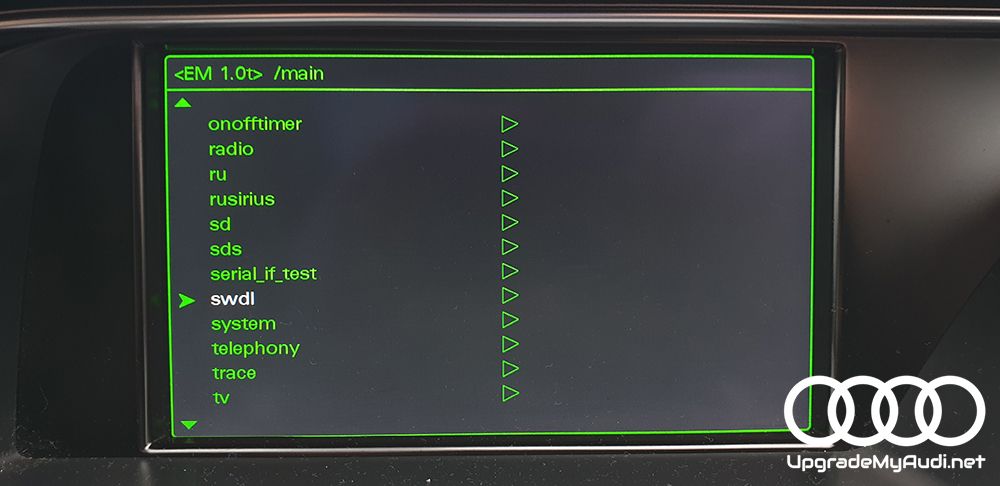
This guide focuses on the available options and functions inside the Audi MMI 3G Hidden Green Menu. If your Green Menu is not enabled yet, follow our step-by-step MMI 2G High and MMI 3G Green Menu activation guide first.
What Is Audi MMI Hidden Green Menu?
The Audi Green menu is a hidden menu that can be accessed by pressing and holding the SETUP button for 5 seconds. This menu provides access to various hidden functions and settings such as the service menu, system information, and software updates.
Enable MMI hidden green menu (2G, 3G, 3G+) - SD CARD Script method
First of all you have to download script from here!
Please unpack the GreenMenuActivation.zip, enter to GreenMenuActivation unzipped folder and copy all content to an empty SD CARD - SD CARD size must be at least 8GB and maximum 32GB (on smaller SD script might not working), formatted in FAT32 file system. In the root folder of the SD card you should see the following files and directories:

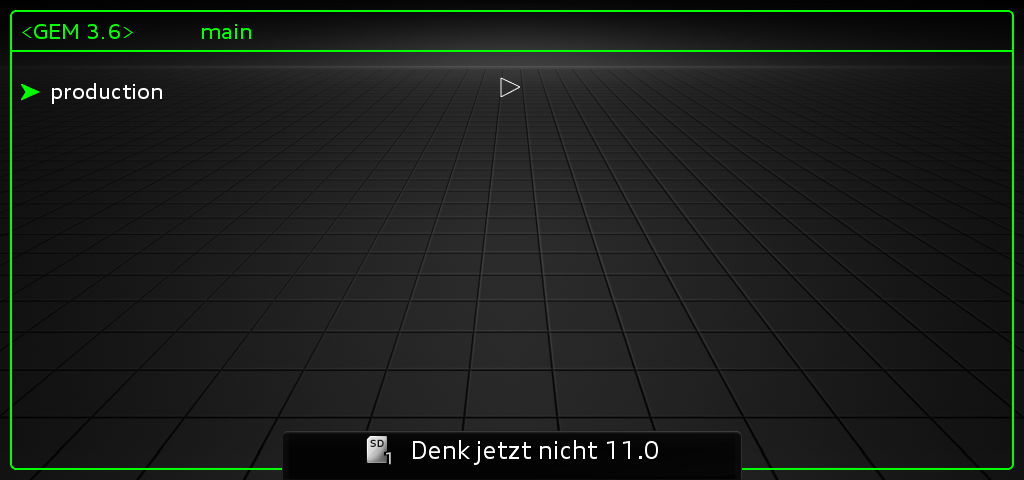
Insert in the MMI SD slot 1, shortly after that you will see the following picture.

Press the big rotary knob and the next screen will appear.

Now restart the unit and follow the rest of the guide.


🚀 Moving Beyond MMI 3G?
Official map updates for legacy MMI 3G systems concluded in 2024. If you are looking for modern navigation, real-time traffic, and full smartphone integration, it is time to explore next-generation alternatives!
Driving a newer Audi model? Discover how to fully unlock and activate Apple CarPlay, Android Auto, and custom firmware on high-performance MIB2 (MHI2 & MHI2q) systems.
How to open Hidden green menu?


In Audi A8 it's a bif different MMI reboot: big button, upper right silver and tone

Enabling Audi MMI hidden menu - VCDS method:
Go to block 5f > Adaption > Jump to channel 6 and add new value 1 then click TEST and after SAVE.
Audi MMI 3G Hidden Green Menu Full List Of Options
- version
- export version info
- export onoff info
- export EPromFlags info
- Start Script
- Train name
- versionmu
- versionru
- versiondu
- versionaudio
- versiontelephony
- versionmost
- versionbt
- addressbook
- is OADB cancelling active
- copy db to sdcard
- copy tef to sdcard
- delete db
- aevtest
- scan for jobs
- fakeaudiosettings
- functiontest
- numlisttest
- scripts
- slidertest
- tabletest
- fakeextra
- audiomanagment
- volumerangers
- Entertainment lowering
- Entertainment min
- Entertainment max
- SDS min
- SDS max
- Navi min
- Navi max
- Telephone min
- Telephone max
- Traffic min
- Traffic max
- audiomisc
- Mute pin state
- Mute behavior actual
- Volume max
- Muting reason
- lenses timer disp. 1 (100ms)
- lenses timer disp. 2 (100ms)
- inputgainoffset
- MW
- FM
- MUCD
- CDC
- DAB
- DVBT
- TV
- SDARS
- TIM
- MU AUX
- MU AUX ADAPT
- MU DVD
- MU FPP
- MU BT Device
- mme
- Activate AMFM cluster
- Deactivate AMFM cluster
- Activate CDC cluster
- Deactivate CDC cluster
- Activate DVDC cluster
- Deactivate DVDC cluster
- volumerangers
- bluetooth
- Link key restruction active
- browser
- Delete Old Non-ISO boardbook
- bths
- bths 1
- byhs 2
- car
- carcodingvehicle
- steering wheel der.
- behicle derivat
- configuration line
- vehicle model line
- Update splashscreen (according car line)
- cardevicelist
- Air condition
- Auxiliary heating
- HUD
- ACC
- Air suspension
- RDK
- Interior light
- Exterior light
- APS
- RVC
- Wiper
- Central lock system
- Mirror
- Board computer
- Clock
- Service interval
- Central unit master
- Compass
- Charisma
- Lane departure warning
- Lange change assist
- Braking assist
- Front seat memory
- Rear seat memory
- Hybrid
- Side view
- carextdevicelist
- MFL
- VIN
- Battery
- Oil level gauge
- Sliding roof
- carfunctionlist
- Parking help audio dim 1
- Parking help audio dim 2
- AM/FM toggle
- Oil level gauge extended
- carprotocollswitch
- Air condition
- Auxiliary heating
- ACC
- Air suspension
- RDK
- Interior light
- Exterior light
- APS
- Wiper
- Central lock system
- Board computer
- Clock
- Service interval
- Braking assist
- Seat memory
- carmenuoperation
- ACC
- interior light
- parking help
- AWV
- line dep. warning
- line change assist.
- exterior light
- battery
- window
- air condition
- instrument cluster
- tires air pressure control
- wiper
- service interval
- seat
- central lock
- compass
- charisma
- oil level
- VIN
- clock
- air suspension
- head up display
- central unit master
- hybrid
- board book
- carcodingvehicle
- config
- Activate DHCP
- Activate fixed IP
- Active IP
- Show current IP address
- language HMI system
- language Navi TTS
- language SDS
- visible languages
- diagnose
- pml
- current value
- Reset Level
- Reset password
- settings
- active HDD Nav DB
- import multimedia
- AMI/AUX
- Delay ref sign (ms)
- Mic sensibility
- Tel settings misc
- Microphones
- Displays
- pml
- dtc
- changed_dtcs
- control
- qualified_dtcs
- show_single_dtc
- untested_dtcs
- eepromflags
- import MM lock status
- Watchdog SH4 status
- environment
- FOT temperature
- Bluetooth device address
- WLAN device address
- hdd
- HDD model
- HDD firmware revision
- HDD serial number
- HDD current temperature
- HDD max temperature
- HDD power state
- smart
- storesmart
- viewsmart
- sparepartnumbers
- VW spare part number
- spare part num front display
- spare part num right display
- spare part num left display
- irc
- trigger
- java
- Free Runtime Memory
- Total Runtime Memory
- Garbage Collect
- media
- Delete Backup Folders
- mediabluetooth
- SPD record (hex)
- mediaplayer
- most
- allocationtable
- centralregistry
- nav
- Active PSD
- databaseupdate
- diagvalues
- engineering
- gps
- map
- sensorik
- tmc
- onoff
- activation state
- onofftimer
- OFF 1 delay (Sec)
- OFF 2 delay (Sec)
- Standby delay (Min)
- Power down delay (Min)
- Off2 power down delay (Sec)
- BEM shutdown delay (Min)
- Transport delay (Sec)
- Power down timers state
- reset all timer values
- reset all timers to test
- radio
- amfm
- Disable Test Mode
- Selected Test Mode
- Current Station
- tunbandinfo
- diagtest
- singletunertest
- stationlist
- testmodea
- testmodec
- testmoded
- dab
- Detected Device
- backgroundscan
- componentlist
- currentstation
- dataservicefilter
- dataservicelist
- diagtest
- ensemblelist
- linkingdelay
- motdecoder
- mutehandling
- pilist
- sdars
- categorylist
- currentstation
- generalinfo
- radiotext
- servicestatus
- stationlist
- versioninfo
- tim
- messagelist
- statusinfo
- timerlist
- tmcchina
- tmcchinastations
- tmcchinastatus
- tunerannouncment
- filter
- status
- amfm
- ru
- Fan speed
- FOT temperature RU
- Amplifier temperature RU
- FOT temperature RU max
- Amplifier temperature RU max
- rusirius
- mode
- sd
- attached sd-devices
- sd-slot1
- Mountpoint
- Cardtype
- Vendor
- Device
- Serial number
- sd-slot2
- Mountpoint
- Cardtype
- Vendor
- Device
- Serial number
- sds
- Last recognized confidence
- Language list
- serial_if_test
- Start serial Test for ETC
- static ETC
- State of last cycle ETC
- Start serial Test for VICS
- static VICS
- State of last cycle VICS
- Start serial Test for IPOD
- static IPOD
- State of last cycle IPOD
- swdl
- count down
- HW index IT
- unexpected resets
- current version
- user defined mode
- ignore region and variant
- system
- is production mode active
- battery voltage (x100mV)
- Choose system tone
- is system tone active
- Serial number
- VW system name
- cable code info (hex)
- connected HUC/BTHS (hex)
- PerfLoad Freq. (sec)
- CPU
- No, Memory, CPU
- kind of state line
- kind lsd
- coredump
- emergencyupdate
- internal
- telephony
- signal quality
- register state
- network type
- network identifiers
- mic mute state
- NAD temp state
- NAD temperature
- handsfree activity
- number of connected devices
- BT connection state
- GSM power state
- btconnecteddevices
- telephonyprovider
- telephonyscript
- telephonystates
- trace
- internfblock
- tracescope
- tv
- tuner state
- selected source
- TV norm area
- Audio format
- Terminal mode
- Key panel state
- Diversity state
- AV 1 norm
- AV 2 norm
- tvtables
- usb
- Num of attached devices
- Used bus, device address
- select USB log. bus
- select USB device address
- info about device with device address, selected above

25 comments
Nice to find this here, but it would be nicer if i would know what every menu/submenu does :)
we have got a plan to describe every option, but need a time as there's a quite a lot of informations.. :)
Can you put full list of options for MIB2 Audi Green Menu ?
will try to do that :)
Hi there I just payed to download the green menu activation but it doesn't work for some reason Could you please help me out with this Thanks
Hi Its 100% compatible with your MMI.. just make sure you are using FAT32 SD CARD at least 8GB OF SIZE smaller might not work, you copied files like show on above screenshots.. When you get in to your car, start ignition and wait 5 minutes, you can jump over all options like media/radio/nav and make sure all of them…
Hi I'm also having the same problem where I download the format on a 16gb SD card, I waited 5 min and tried each slot and nothing popped out
Hi, send us email: [email protected] with screenshots of SD CARD content.. you can also try with different SD (make sure it's formatted AS FAT32 otherwise it will not work)
For some reason it says address can't be found
My fault.. [email protected] :)
I have sent an email but didn't get any reply
just replied.. your message jumped to the spam...
Thank you it worked!
Where can I email you?
I know what every option does, post here
Hi There's my email: [email protected]
Hi, in case it does not work with your SD-Card because you use 64GB and have no FAT32 format. Here is how to format your SD-Card: Then follow the instruction on this website.
We do have a solution for this https://mmiupdates.com/tutorials/how-to-unpack-files/
Can i hace the download link ?
Here you can get https://mmiupdates.com/product/audi-mmi-3g-3gp-3ghigh-green-menu-activator/
Hi, I'm working through a bundle FW and map update on a 2015 A8 D4 model. Script applied for hidden green menu, however unable to bring it up to disable Bose option. Menu + Car doesn't do it or Tone + Big button + Side R. Any suggestions?
Hej you need to keep trying, maybe you have sticky buttons? Remember, that MMI has to be fully loaded up, all functions must be working (not on initialisation status). In A8 D4 should be MENU + CAR, try to press them together at the same time. If it jumps somewhere else, just go back to the main MMI interface and try…
could you send it to me?
What you mean?
Hello, I bought an Audi A5 from 2015 and I see that the previous user played with the green menu. Does anyone have a photo of what the settings for parking assist, air conditioning, languages and tire pressure control should look like?
Sign in or create an account to leave a comment →