Audi MMI 3G & 3G Plus EEPROM Explained
What Is the EEPROM in Audi MMI 3G?
Audi MMI 3G and MMI 3G Plus units contain a small non-volatile EEPROM that stores configuration data which must remain available even when the infotainment unit has no power.
Depending on the MMI version and configuration, EEPROM data can include information related to:
- permitted language configuration
- firmware information
- regional configuration
- unit-specific settings
- Component Protection data
- other low-level MMI configuration values
This article explains the EEPROM structure and known data areas used in MMI 3G systems.
It is intended as a technical reference, not as a universal EEPROM file for every Audi MMI unit.
Which Audi MMI Systems Does This Apply To?
This article is specifically about EEPROM used in Audi MMI 3G-family infotainment units.
Typical systems include:
- HNav_ - MMI 3G High
- HN+_ - MMI 3G Plus
- HN+R_ - MMI 3G Plus
Some information may also be relevant to other MMI 3G-family hardware, but the EEPROM structure should not be assumed to be identical across every unit.
This guide does NOT describe EEPROM layouts for:
- MHI2_
- MHI2Q_
- MHS2_
- MH2p_
- MHI3_
- MST2_
EEPROM Chip Used in MMI 3G
Known MMI 3G units use a serial EEPROM from the AT24C64 family.
A commonly referenced part is:
AT24C64A-10TQ-2.7
The device is a 64-Kbit serial EEPROM organized as:
8192 × 8 bits
This means the total storage capacity is:
8192 bytes
or
8 KB
The chip can be marked with shortened package markings such as:
AT64A
depending on the component revision and package.
Where is EEPROM on MMI unit?
The chip is manufactured by Atmel specifically for Automotive industry as a 2-Wire EEPROM. It has a capacity of 64Kb. The full part number is AT24C64A-10TQ-2.7 but it’s labelled as Q3, A, AT64A. You can find more information about the chip here (click)

How Can the MMI 3G EEPROM Be Read?
There are two general approaches.
Direct EEPROM access
The memory chip can be accessed with a compatible EEPROM programmer.
This normally requires electronic-level access to the MMI mainboard and should only be performed by someone experienced with SMD electronics.
Diagnostic access through the MMI
Certain specialist diagnostic tools can access EEPROM data through the infotainment control unit.
Standard tools such as VCDS should not be assumed to provide unrestricted EEPROM read/write access.
Specialist access can require platform-specific diagnostic communication and authorization.

MMI 3G EEPROM Memory Map
Known EEPROM dumps show several recognizable areas containing MMI configuration data.
The exact layout can depend on the MMI hardware and software generation, so offsets should be treated as reference values from known units rather than guaranteed locations for every MMI 3G unit.
Always create and preserve the original EEPROM dump before comparing or modifying any data.
EEPROM known content:
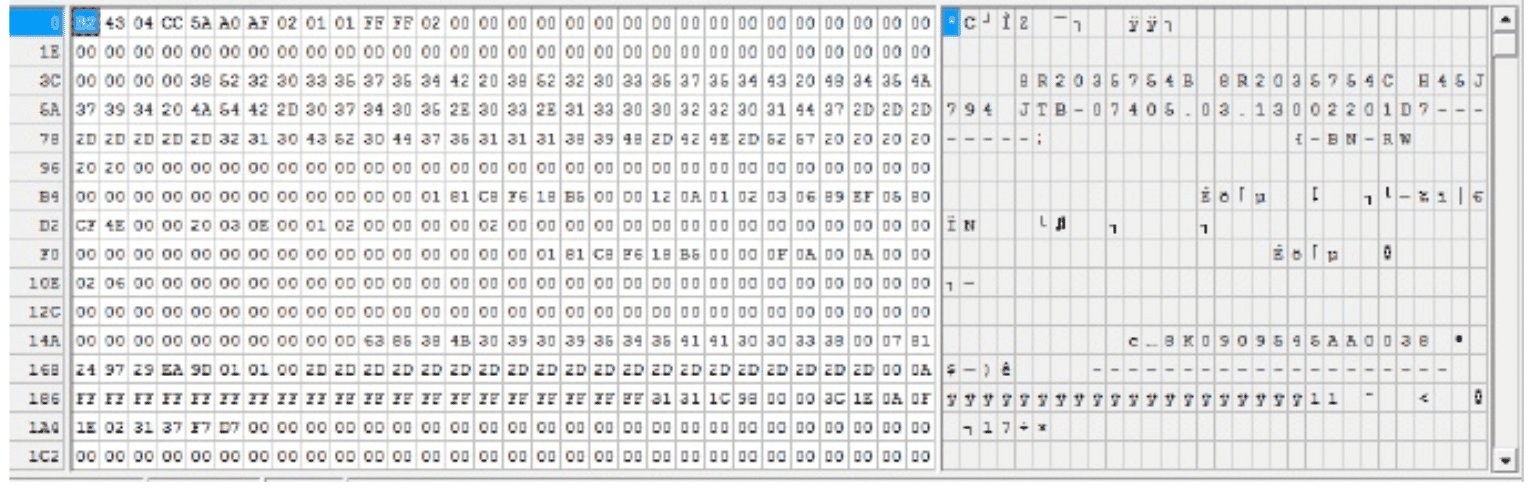
The EEPROM in MMI only uses 8192 bytes of the chip, when opening the content with HexEditor such as XVI32 it looks like this:


| EEPROM area | Known purpose |
|---|---|
| Language data | Determines available / permitted firmware language configuration |
| Component Protection area | Vehicle-specific protection data |
| Firmware information | Stores information related to installed firmware |
| MMI configuration | Additional binary configuration values |
Language Configuration in EEPROM
The EEPROM contains information controlling which language sets are permitted by the MMI configuration.
North American units typically use a different language configuration from European units.
For example, a North American configuration can include:
- English
- Spanish
- French
while a European configuration can support a broader language set.
This becomes important during regional firmware conversions.
Installing European firmware over a North American configuration does not necessarily mean that the correct European language configuration will automatically become available.
The EEPROM configuration, firmware files and language data must remain compatible with each other.
US \ NAR:

European:

If you need to install languages, you have to modify EEPROM first and then then re-apply the appropriate firmware files. The language setup is introduced by EEPROM, referenced by root-ifs.ifs file on the flash and the actual language files are saved on the hard drive.
Component Protection Data
Audi / Volkswagen Group uses Component Protection to prevent unauthorized replacement of protected vehicle modules.
MMI 3G EEPROM contains data associated with this protection mechanism.
This becomes relevant when:
- replacing an MMI main unit
- repairing a damaged unit
- transferring configuration between replacement hardware
- performing certain MMI 3G to 3G Plus hardware retrofits
Component Protection data is vehicle-specific and should not be treated as a generic value that can be generated from the VIN alone.
When replacing or adapting protected modules, use the appropriate authorized or specialist diagnostic procedure for the vehicle.

You can transfer / duplicate / remove this section between all different MMI 3G and MMI 3G Plus units. When you upgrade MMI 3G to 3G plus this is the section that you will need to transfer. As of this minute (when typing this documents) there isn’t an easy way to translate or generate the above code. It’s not based on VIN only, it’s also based on several other variables that get pulled from CAN gateway.
Firmware Information Stored in EEPROM
Known MMI 3G EEPROM dumps contain firmware-related information in a recognizable section of the memory.
On documented examples, firmware information can be found around the 0x0910 area.
Because different MMI revisions exist, do not assume that every EEPROM dump is byte-for-byte identical.
Use the firmware information as one reference point together with the full software train displayed by the MMI.

Additional MMI Configuration Data
A significant part of the EEPROM contains binary configuration values that are not directly readable as normal text.
These values can describe internal MMI configuration and unit-specific settings.
Do not copy large EEPROM blocks from another unit simply because the hardware looks identical.
Differences in:
- hardware revision
- region
- firmware
- vehicle configuration
- installed equipment
can make two apparently similar EEPROM dumps incompatible.
A lot of other configurations are encoded in none human readable format unfortunately are saved on address 0x0B00 between 2823 and 6540.
When Is MMI 3G EEPROM Work Actually Required?
Most normal MMI users never need to modify the EEPROM.
EEPROM work becomes relevant mainly during:
- MMI region conversions
- MMI unit repair
- replacement of damaged infotainment hardware
- recovery from incorrect low-level configuration
- MMI 3G to MMI 3G Plus hardware retrofits
- specialist comparison of configuration between units
A normal firmware update or navigation map update does not normally require manual EEPROM editing.
Always Keep the Original EEPROM Backup
Before any EEPROM modification, create a complete verified backup of the original memory.
Keep the original dump unchanged.
A backup is essential because the EEPROM contains unit-specific configuration that may not be recoverable from a generic file downloaded from another vehicle.

0 comments
Sign in or create an account to leave a comment →