What Is VCDS for Audi? Complete Diagnostics and Coding Guide
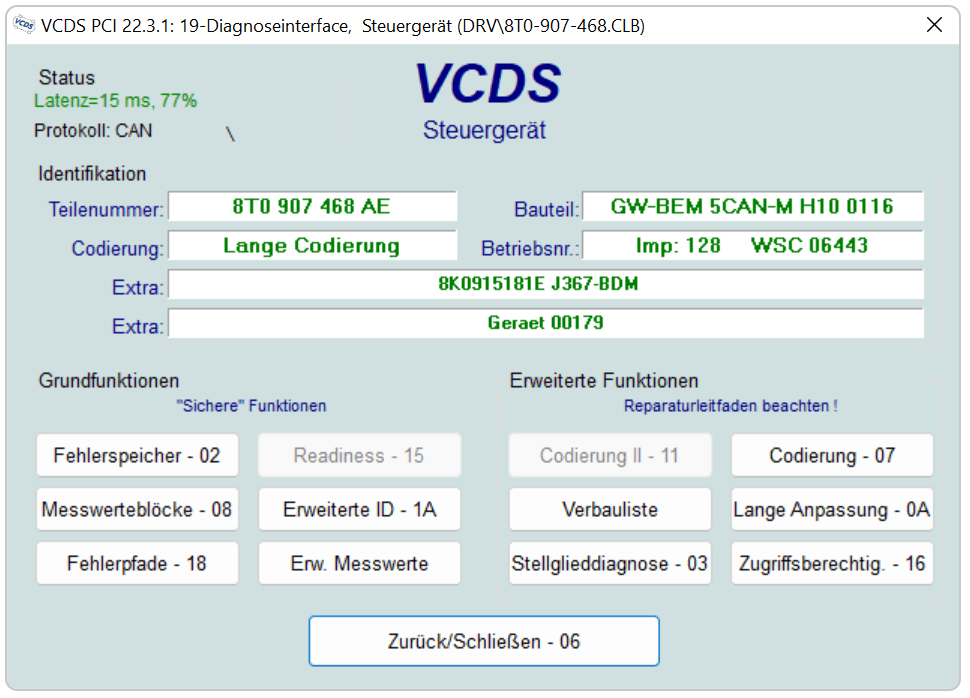
VCDS is one of the most useful diagnostic tools available for Audi and other Volkswagen Group vehicles. It can communicate with control modules that a basic OBD-II scanner may not even detect, making it useful for fault diagnosis, maintenance, coding and vehicle-specific adaptations.
However, VCDS is not a universal tool that automatically unlocks every hidden feature. Its available functions depend on the vehicle, control module, software version and diagnostic security used by Audi.
This guide explains what VCDS is, how it works and what Audi owners should know before changing any coding or adaptation values.
What Does VCDS Stand For?
VCDS stands for:
VAG-COM Diagnostic SystemThe software is developed by Ross-Tech for Volkswagen Group vehicles, including:
- Audi;
- Volkswagen;
- SEAT;
- Škoda;
- selected Bentley and Lamborghini models using compatible Volkswagen Group control systems.
VCDS was previously known as VAG-COM. The newer name is now used for the current Ross-Tech diagnostic system.
How Does VCDS Work?
VCDS runs on a Windows computer and connects to the vehicle through a compatible diagnostic interface connected to the OBD port.
After establishing communication, VCDS can access individual vehicle controllers, including systems such as:
- engine;
- transmission;
- ABS and stability control;
- airbags;
- central electronics;
- CAN Gateway;
- infotainment;
- parking assistance;
- climate control;
- instrument cluster;
- battery management.
The exact list depends on the equipment installed in the vehicle.
VCDS does not replace the software inside the car. It sends diagnostic requests to the control modules and displays the information returned by them.
VCDS vs a Generic OBD-II Scanner
A basic OBD-II scanner normally focuses on emissions-related engine faults. It may read and clear common powertrain codes, but often cannot communicate properly with Audi-specific comfort, infotainment or body-control modules.
VCDS is designed specifically for Volkswagen Group vehicles.
| Function | Generic OBD-II scanner | VCDS |
|---|---|---|
| Read basic engine faults | Usually | Yes |
| Access Audi-specific modules | Limited | Yes, when supported |
| Full vehicle Auto-Scan | Usually unavailable | Yes |
| View measuring values | Basic | Extensive |
| Coding and adaptations | Rarely | Yes, when supported |
| Basic Settings and calibration | Usually unavailable | Yes, when supported |
| Vehicle-specific fault descriptions | Limited | Extensive |
VCDS still does not provide every function available through Audi’s factory diagnostic and online systems. Some operations require factory authorization, component-specific tools or online access.
The Most Important VCDS Functions
Auto-Scan
Auto-Scan checks the control modules installed in the vehicle and records their identification, coding and fault codes.
Before changing anything, save a complete Auto-Scan. It provides a valuable reference if a coding value needs to be restored later.
A saved scan can also help identify:
- control module part numbers;
- software versions;
- existing fault codes;
- communication problems;
- installed vehicle equipment.
Fault Codes
VCDS can read Audi and Volkswagen Group diagnostic trouble codes from supported modules.
A fault code should not automatically be treated as proof that a component must be replaced. It identifies the system that detected a problem, but proper diagnosis may also require wiring checks, measuring values and physical inspection.
Clear codes only after saving the original scan and understanding why the fault appeared.
Measuring Values
Measuring Values show live information reported by a control module. Depending on the system, this may include:
- temperatures;
- pressures;
- voltages;
- sensor signals;
- switch positions;
- battery data;
- engine operating parameters;
- regeneration or emissions information.
Live data is especially useful when a fault occurs only under particular operating conditions.
Coding
Coding configures how a control module is installed and which supported functions it should use.
Depending on the Audi model, coding may control options such as:
- lighting behaviour;
- selective locking;
- warning settings;
- equipment configuration;
- certain instrument-cluster functions.
Never copy an entire coding value from another vehicle simply because it is the same model. Equipment differences can make that coding unsuitable.
Adaptation
Adaptation changes individual settings stored inside a control module.
Common examples include:
- battery registration;
- service interval settings;
- mirror behaviour;
- lighting preferences;
- convenience functions;
- infotainment-related settings.
Save the original adaptation value before changing it.
Basic Settings
Basic Settings initiate controller-supported procedures such as calibration, initialization or component learning.
This is more sensitive than changing a convenience setting. Running the wrong Basic Setting can interrupt calibration or leave a system requiring additional procedures.
Use it only when you have instructions for the exact vehicle and controller.
Output Tests
Output Tests allow supported components to be activated for diagnostic purposes. This can help verify whether a relay, lamp, motor, valve or other controlled component responds correctly.
Ensure that activating the component is safe before starting a test.
What Can You Do with VCDS on an Audi?
Common VCDS tasks include:
- running a complete diagnostic scan;
- reading and clearing fault codes;
- viewing live sensor data;
- registering a replacement battery;
- resetting supported service intervals;
- performing controller-supported calibrations;
- changing selected convenience settings;
- checking control-module identification;
- recording original coding before repairs;
- diagnosing communication faults between controllers.
Not every function is available on every Audi. Two cars from the same year can use different controllers, software versions and security systems.
Example: Coding a Replacement Audi Battery
Audi battery adaptation may be located in module 61, module 19 or module 09, depending on the vehicle platform.
Our complete battery coding guide explains how to identify the correct controller and distinguish between the battery part number, manufacturer code and serial number.
https://mmiupdates.com/tutorials/how-to-code-new-car-battery-vcds/
Can VCDS Enable Hidden Audi Features?
VCDS can enable some functions that are already supported by the vehicle’s installed control modules and equipment.
Examples may include:
- needle sweep;
- mirror tilt when reversing;
- selected lighting adaptations;
- alarm confirmation;
- service interval configuration.
Availability depends on the vehicle. VCDS cannot add hardware that is not installed, and changing a software value does not guarantee that every related function will work.
Before performing a modification:
- Run and save an Auto-Scan.
- Record the original coding or adaptation value.
- Confirm that the procedure applies to the exact controller.
- Change one setting at a time.
- Scan the vehicle again after completing the work.
Can Incorrect VCDS Coding Cause Problems?
Yes. Incorrect coding or adaptation can disable functions, generate fault codes or create configuration conflicts.
The risk is higher when:
- copying coding from another car;
- changing several values simultaneously;
- ignoring the original controller configuration;
- running undocumented Basic Settings;
- coding while vehicle voltage is unstable;
- following instructions written for another control-module version.
VCDS itself is a diagnostic tool. The result depends on the commands and values entered by the person using it.
Does VCDS Affect the Vehicle Warranty?
There is no universal answer.
Reading fault codes or saving an Auto-Scan is different from changing controller coding, performing adaptations or modifying vehicle configuration. Warranty implications can depend on the vehicle, market, modification and reason for a later claim.
Do not rely on claims that diagnostic coding can never affect warranty coverage. If the car is under warranty, confirm the implications before making configuration changes.
What Are SFD and SFD2?
Newer Volkswagen Group vehicles use additional diagnostic protection systems known as SFD and SFD2.
These systems can restrict access to protected adaptations, coding or software-related functions. Having VCDS does not automatically provide authorization to bypass those protections.
On a protected vehicle, VCDS may still provide useful diagnostic information, but some changes can require:
- an authorized unlock process;
- online access;
- a supported diagnostic account;
- additional factory-level procedures.
SFD2 is more restrictive than the earlier SFD implementation. Compatibility should be checked before purchasing a diagnostic interface specifically for coding a newer Audi.
Do You Need an Original Ross-Tech Interface?
Current legitimate versions of VCDS are designed to operate with compatible Ross-Tech interfaces.
An original interface provides:
- licensed software access;
- official updates;
- controller compatibility updates;
- technical support;
- reliable communication with supported vehicles.
Unlicensed or counterfeit interfaces may use modified, outdated software and can behave unpredictably with newer control modules. Diagnostic communication is not a good place to rely on unknown hardware or modified software.
Is VCDS Suitable for Beginners?
VCDS can be used by beginners for basic diagnostic work, provided they follow a cautious process.
Good first tasks include:
- running an Auto-Scan;
- reading fault codes;
- viewing controller information;
- saving measuring values;
- recording the vehicle’s original coding.
Coding, adaptations and Basic Settings require more care. Always understand what a setting controls before changing it.
VCDS Frequently Asked Questions
Is VCDS the same as VAG-COM?
Does VCDS work with every Audi?
Can VCDS program keys?
Can VCDS update MMI firmware?
Can VCDS remove Component Protection?
Can VCDS bypass SFD2?
Can VCDS damage a control module?
Does VCDS work on macOS?
Final Advice
VCDS is an extremely capable diagnostic system for Audi and other Volkswagen Group vehicles, but its greatest advantage is access to detailed, vehicle-specific information—not the ability to change settings blindly.
Start with a complete Auto-Scan, preserve every original value and verify that a procedure matches the exact control module before making changes. Used carefully, VCDS can make fault diagnosis, maintenance and supported Audi coding much more transparent.



0 comments
Sign in or create an account to leave a comment →