Audi MMI 3G to MIB2 Upgrade - Can You Retrofit the Newer System?
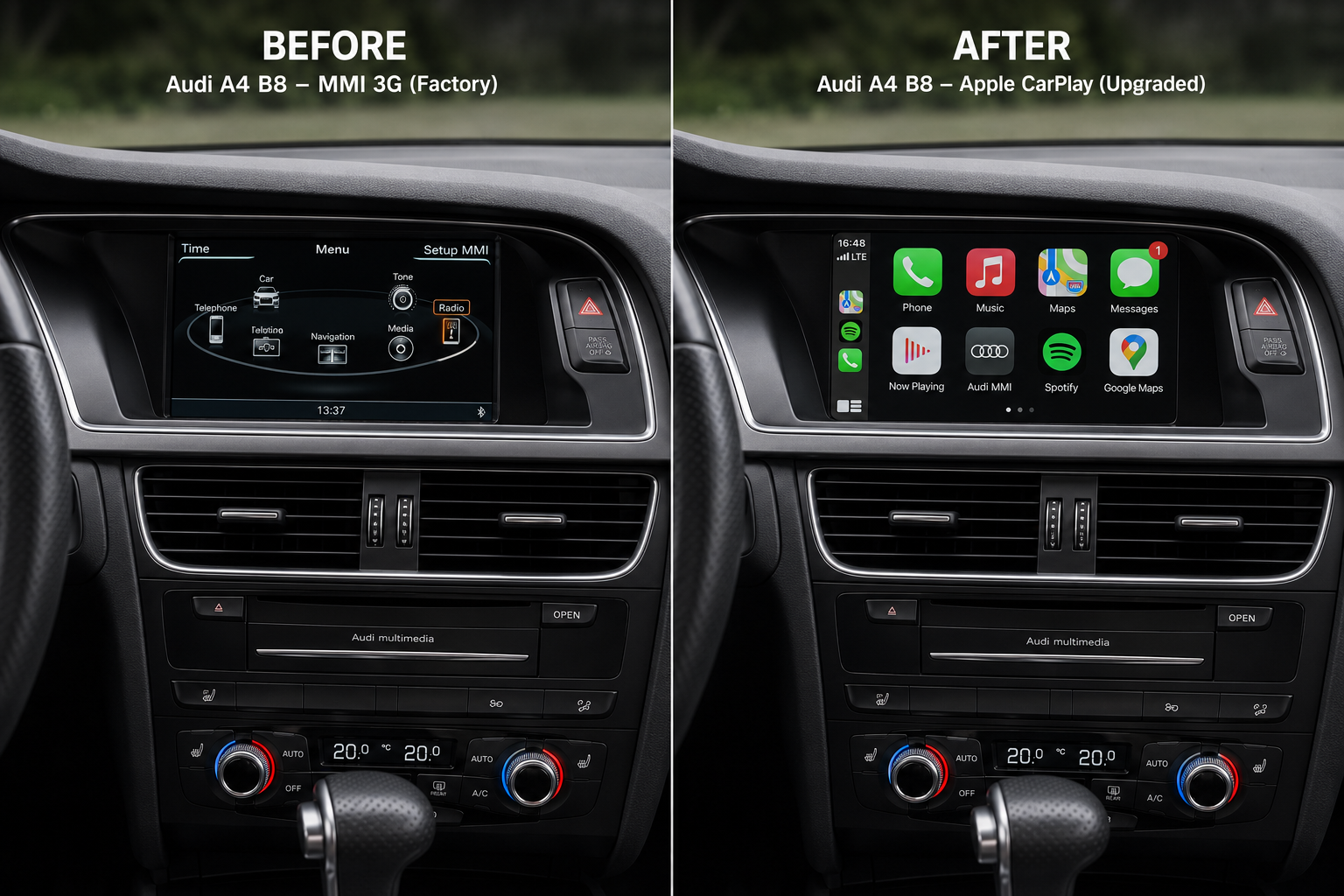
If your Audi still uses MMI 3G, you may eventually start wondering whether the complete infotainment system can be upgraded to the newer MIB2 platform.
At first, it sounds straightforward.
Install newer firmware, replace a few parts and suddenly an older Audi gains the faster MIB2 interface, Apple CarPlay, Android Auto and more modern navigation.
Unfortunately, it is not that simple.
MMI 3G and MIB2 are different hardware generations.
You cannot convert an MMI 3G system into MIB2 by installing a firmware update.
A real MMI 3G to MIB2 conversion is a hardware retrofit, and depending on the Audi model and existing equipment it can involve replacing several infotainment components, adapting wiring, handling Component Protection and coding the new equipment to the vehicle.
The retrofit can be technically possible in selected cars.
The more important question is:
Do you actually need a complete MIB2 retrofit, or are you mainly trying to add modern functions such as Apple CarPlay and Android Auto?
For many MMI 3G owners, keeping the original MMI and adding a CarPlay / Android Auto interface is a much simpler solution.
Quick Answer - Can MMI 3G Be Upgraded to MIB2?
Yes, a hardware retrofit can be possible in some Audi models.
But:
MMI 3G cannot become MIB2 through a software or firmware update.
Here is the basic difference:
| Option | Firmware Update | Full MIB2 Retrofit | CarPlay Module |
|---|---|---|---|
| Keeps original MMI 3G hardware | Yes | No | Yes |
| Converts the car to MIB2 | No | Yes | No |
| Requires major hardware changes | No | Yes | Limited |
| Can add modern CarPlay by itself | No | Yes, if final setup supports it | Yes |
| Retains original 3G interface | Yes | No | Yes |
| Complexity | Low | High | Medium |
| Best if you only want CarPlay | No | Usually unnecessary | Often yes |
If your main goal is Apple CarPlay, Android Auto, Google Maps, Waze and Spotify, a complete MIB2 conversion is often more work than necessary.
First - Which Audi MMI System Do You Have?
Before considering any retrofit, identify the infotainment system already installed in the car.
Typical MMI 3G software prefixes include:
BNav_
HNav_
HN+_
HN+R_
These generally correspond to:
| Software prefix | System |
|---|---|
BNav_ | MMI 3G Basic |
HNav_ | MMI 3G High |
HN+_ | MMI 3G Plus |
HN+R_ | MMI 3G Plus |
MIB2 systems use different software families, for example:
MHI2_
MHI2Q_
MHS2_
If you do not know which system is installed in your Audi, start with our:
Which Audi MMI Do I Have? Complete Identification Guide
A Firmware Update Does Not Convert MMI 3G to MIB2
This is the most important point in the entire guide.
Updating an MMI 3G system can give you a newer version of MMI 3G firmware.
It cannot change the physical platform.
For example:
HN+_EU_AU3G_...will remain an MMI 3G Plus system after a compatible firmware update.
It cannot become:
MHI2_ER_...because MIB2 uses different infotainment hardware and software architecture.
Think of firmware as updating the operating software of the hardware already installed in the vehicle.
It does not replace that hardware with a newer generation.
For actual MMI 3G firmware installation, use our separate guide:
How to Update Audi MMI 3G Firmware
What Is a Real MMI 3G to MIB2 Retrofit?
A true conversion means physically installing MIB-generation equipment into a vehicle originally equipped with MMI 3G.
The exact parts depend heavily on:
- Audi model
- model year
- original MMI version
- dashboard configuration
- sound system
- display
- controls
- existing wiring
- region
- donor equipment
There is therefore no universal MMI 3G → MIB2 shopping list.
Depending on the vehicle, a retrofit may involve some combination of:
- MIB2 main infotainment unit
- compatible display
- control panel or rotary controller
- USB / Audi Smartphone Interface hardware
- new or adapted wiring
- LVDS/display connections
- antennas
- coding and adaptations
- Component Protection handling
- navigation configuration
- regional configuration
- audio-system compatibility work
Some vehicles require fewer changes.
Others can become considerably more complicated.
MMI Main Unit
The main unit is at the heart of the conversion.
MMI 3G and MIB2 do not run on the same infotainment computer.
A genuine MIB2 retrofit therefore requires a compatible MIB unit rather than trying to flash MIB software onto an MMI 3G unit.
The replacement unit must also be appropriate for:
- the Audi platform
- vehicle equipment
- region
- display
- controls
- audio configuration
Buying a random MIB2 unit because the connector appears similar is not a safe retrofit strategy.
Do You Need to Replace the Screen?
Sometimes, but not universally.
The display used with the original MMI 3G system may not be suitable for the planned MIB2 configuration.
Compatibility can involve:
- resolution
- display electronics
- LVDS communication
- physical dimensions
- mounting
- dashboard trim
Depending on the particular Audi and retrofit path, a compatible newer display may be needed.
This is one reason a full MIB2 conversion needs to be planned on a vehicle-by-vehicle basis.
Do You Need New MMI Controls?
Potentially.
Different infotainment generations can use different control panels and button layouts.
A complete MIB2 retrofit may therefore involve replacing or adapting the center-console controls.
This is particularly relevant if you want the finished installation to behave and look like a factory MIB-equipped vehicle rather than simply making the new head unit turn on.
USB Hardware and Audi Smartphone Interface
One of the main reasons owners consider an MIB2 retrofit is Apple CarPlay and Android Auto.
But installing an MIB2 head unit does not automatically guarantee that the vehicle contains all hardware needed for smartphone integration.
Compatible systems may require appropriate:
- USB data hardware
- USB hub
- smartphone-interface connection
- wiring
A charging USB socket is not automatically the same as a data-capable Audi Smartphone Interface port.
This hardware needs to be considered as part of the retrofit plan.
Wiring Can Be Different
A factory infotainment system communicates with many other vehicle systems.
That can include:
- instrument cluster
- amplifier
- steering-wheel controls
- gateway
- Bluetooth
- microphones
- navigation antennas
- reverse camera
- parking system
- vehicle settings
When moving between infotainment generations, connectors and communication requirements may differ.
Some retrofit installations can use adapter harnesses.
Others may require individual wiring changes.
This is why a full MIB2 conversion is fundamentally different from a normal firmware update.
What About Component Protection?
Used Audi infotainment components can be protected by Component Protection.
If a protected component is installed in another vehicle, some functions may be restricted until the component is properly adapted to the new car.
Whether Component Protection is involved depends on the exact components being replaced and the vehicle platform.
Therefore:
do not buy a used MIB2 unit assuming it will simply be plug-and-play.
Component Protection and vehicle adaptation should be included in the retrofit plan before purchasing hardware.
Does an MIB2 Retrofit Require Coding?
Normally some level of vehicle configuration should be expected.
The new infotainment system needs to work correctly with the equipment actually installed in the car.
Depending on the vehicle, configuration can involve:
- installed audio system
- amplifier
- steering-wheel controls
- parking sensors
- rear-view camera
- navigation
- vehicle menus
- instrument cluster
- smartphone interface
- region
- language
The exact coding procedure varies between models and retrofit combinations.
What About BOSE or Bang & Olufsen?
Premium audio makes retrofit planning more important.
Audi used different sound-system configurations across models and generations.
If your vehicle has:
- BOSE
- Bang & Olufsen
- an external amplifier
you should confirm audio compatibility before buying the replacement infotainment hardware.
Do not assume that every MIB2 unit will communicate with every amplifier configuration without additional work.
MMI 3G vs MIB2 - What Do You Actually Gain?
A properly configured MIB2 retrofit can provide a newer infotainment platform.
Potential benefits can include:
- newer interface
- improved system responsiveness
- newer navigation platform
- modern smartphone integration
- Apple CarPlay
- Android Auto
- newer media functionality
But the value of those improvements depends heavily on what you actually want from the vehicle.
If the only missing feature in your MMI 3G car is CarPlay, replacing the complete infotainment platform may not be necessary.
Option 1 - Keep MMI 3G and Update It
If you are satisfied with the original system, you can simply keep MMI 3G.
Depending on the exact unit, you can maintain:
- firmware
- navigation maps
- Bluetooth
- factory navigation
- vehicle settings
- original Audi integration
This is the least invasive approach.
However, updating MMI 3G firmware alone does not add native Apple CarPlay.
Option 2 - Full MMI 3G to MIB2 Retrofit
This is the most complete option.
You replace the old infotainment platform with newer-generation hardware.
It is appropriate when the actual goal is:
“I want the car to have MIB2, not just CarPlay.”
A full retrofit may make sense for an enthusiast who:
- wants a factory-style newer platform
- is prepared to source compatible components
- understands coding and Component Protection
- wants deeper integration than a CarPlay interface
- is restoring or extensively modernizing the vehicle
The disadvantage is complexity.
It is not a normal weekend firmware update.
Option 3 - Keep MMI 3G and Add CarPlay / Android Auto
For many owners, this is the most practical middle ground.
Instead of replacing the original Audi infotainment system, a compatible interface is installed alongside it.
The original MMI remains available.
The interface adds:
- Apple CarPlay
- Android Auto
- Google Maps
- Apple Maps
- Waze
- Spotify
- smartphone voice control
Depending on the hardware, wireless connectivity may also be available.
See our complete:
Audi MMI 3G CarPlay Retrofit Guide
How Does the MMI 3G CarPlay Module Work?
The interface connects to the existing infotainment installation rather than replacing it.
A typical installation may involve:
- main harness
- display/LVDS connection
- audio
- USB
- Wi-Fi antenna
- module configuration
You can then switch between:
original Audi MMI
and
CarPlay / Android Auto
without converting the vehicle to MIB2.
For the physical procedure, see:
Audi MMI 3G CarPlay Module Installation Guide
Does a CarPlay Module Turn MMI 3G Into MIB2?
No.
This distinction matters.
The vehicle still has MMI 3G.
The module adds an additional smartphone-integration interface.
So:
MMI 3G + CarPlay module
≠
MIB2
You gain many of the modern functions owners actually want without changing the underlying Audi infotainment generation.
MMI 3G + CarPlay vs Full MIB2 Retrofit
| Feature | MMI 3G + CarPlay Module | Full MIB2 Retrofit |
|---|---|---|
| Original MMI 3G retained | Yes | No |
| Apple CarPlay | Yes, compatible module | Possible |
| Android Auto | Yes, compatible module | Possible |
| Google Maps / Waze | Yes | Yes |
| Factory MIB2 menus | No | Yes |
| Requires new main MMI unit | No | Yes |
| Potential display replacement | No in normal module install | Possibly |
| Component Protection considerations | Usually not from adding interface | Potentially |
| Extensive coding | Usually no | Often required |
| Installation complexity | Moderate | High |
| Full new infotainment generation | No | Yes |
This is why the correct choice depends on whether you actually want MIB2 itself or simply its most desirable modern functions.
Is MIB2 Better Than MMI 3G?
Technically, MIB2 is a newer infotainment generation.
But “newer” does not automatically mean a complete conversion is worthwhile for every car.
A well-maintained MMI 3G system can still handle:
- radio
- vehicle settings
- media
- navigation
- Bluetooth
very well.
Adding CarPlay can then move navigation, music and smartphone apps to a modern phone-based environment.
The result can provide the functions most drivers use every day without replacing the original Audi system.
Can You Add Apple CarPlay to MMI 3G Through Firmware?
No.
This is worth repeating because it is one of the most common questions we receive.
A firmware package for:
BNav_
HNav_
HN+_
HN+R_
does not transform the system into native MIB2 CarPlay.
MMI 3G requires an appropriate hardware retrofit if Apple CarPlay or Android Auto is the goal.
What If Your Audi Already Has MIB2?
Then do not install an MMI 3G CarPlay module before checking the existing MIB2 capabilities.
Systems beginning with:
MHI2_
MHI2Q_
may support native CarPlay / Android Auto activation depending on their exact hardware and software configuration.
See our main:
Audi CarPlay & Android Auto Upgrade Guide
and:
Audi MIB2 CarPlay & Android Auto Activation Guide
MMI 3G to MIB2 Retrofit - When Does It Make Sense?
A full MIB2 retrofit may make sense when:
- you specifically want the newer factory infotainment platform
- compatible parts are available
- you understand the required coding
- Component Protection can be handled correctly
- the vehicle is worth the additional retrofit work
- you are already doing a larger interior/electronics retrofit
It makes less sense when your entire objective is:
“I want Google Maps and Spotify on the factory screen.”
For that requirement, a CarPlay interface can achieve the goal with far fewer changes.
What Should You Check Before Buying MIB2 Retrofit Parts?
Before purchasing anything, document the current vehicle configuration.
At minimum check:
Current MMI version
Example:
HN+_EU_AU3G_...Audi model and platform
Not only “Audi A6”, but the exact generation.
Current display
Check resolution, type and connection.
Audio system
Standard, BOSE, Bang & Olufsen or another configuration.
Existing controls
Determine which center-console control panel is fitted.
Navigation region
Europe, North America or ROW matters for the final system configuration.
Additional equipment
For example:
- reverse camera
- parking sensors
- steering-wheel controls
- external amplifier
- Virtual Cockpit / instrument-cluster configuration where applicable
A retrofit should be designed around the actual car, not only around the donor MIB unit.
Can You Use a Second-Hand MIB2 Unit?
Potentially, but buying the head unit is only part of the project.
Before purchasing a used unit, check:
- hardware compatibility
- donor vehicle
- software train
- region
- Component Protection
- display compatibility
- controls
- audio compatibility
- required USB hardware
A cheap MIB2 unit can become an expensive mistake if the surrounding components do not match the car.
Is an MMI 3G to MIB2 Retrofit Plug-and-Play?
Generally, you should not plan it as a plug-and-play upgrade.
Even when physical adapters are available, a full infotainment-generation conversion can still require vehicle-specific:
- wiring
- coding
- activation
- protection handling
- configuration
The phrase “plug-and-play” is much more appropriate for selected CarPlay retrofit interfaces than for a complete 3G → MIB2 conversion.
What Is the Best Upgrade for Most MMI 3G Owners?
It depends on the goal.
You only want newer firmware
Keep MMI 3G and update the correct firmware.
You only want newer navigation maps
Keep MMI 3G and install the compatible map database.
You want Apple CarPlay / Android Auto
Keep MMI 3G and consider a compatible hardware interface.
You specifically want the complete MIB2 platform
Plan a real hardware retrofit.
That distinction prevents a lot of unnecessary work.
MMI 3G Upgrade Decision Table
| Your goal | Recommended direction |
|---|---|
| Fix bugs / update MMI software | MMI 3G firmware update |
| Newer factory navigation | MMI 3G map update |
| Apple CarPlay | MMI 3G CarPlay module |
| Android Auto | MMI 3G CarPlay/Android Auto module |
| Google Maps / Waze | CarPlay / Android Auto module |
| Factory MIB2 interface | Full MIB2 hardware retrofit |
| Native MIB2 architecture | Full MIB2 retrofit |
| Unsure which MMI you have | Identify MMI first |
Frequently Asked Questions
Can Audi MMI 3G be upgraded to MIB2?
Can MMI 3G become MIB2 with a firmware update?
Is MMI 3G to MIB2 conversion possible?
What is required for an Audi MIB2 retrofit?
Do I need to replace the MMI unit to install MIB2?
Do I need a new screen?
Does an MIB2 retrofit require Component Protection removal?
Does an MIB2 retrofit require coding?
Is MIB2 better than MMI 3G?
Is it worth upgrading MMI 3G to MIB2?
Can I add CarPlay without converting MMI 3G to MIB2?
Can MMI 3G firmware add Apple CarPlay?
Does a CarPlay module convert MMI 3G into MIB2?
Can I keep factory Audi navigation after installing a CarPlay module?
How do I know if my Audi has MMI 3G?
BNav_, HNav_, HN+_ and HN+R_ indicate MMI 3G families.Final Verdict
Audi MMI 3G can be replaced by MIB2 in a properly planned hardware retrofit, but MMI 3G cannot be converted to MIB2 through firmware.
That is the key distinction.
A real conversion can involve:
- different infotainment hardware
- display compatibility
- controls
- USB hardware
- wiring
- coding
- Component Protection
- regional and vehicle-specific configuration
For an owner who genuinely wants the newer factory MIB2 platform, that work may be justified.
But if the actual goal is simply:
- Apple CarPlay
- Android Auto
- Google Maps
- Waze
- Spotify
there is a much simpler route.
Keep the original MMI 3G system and add a compatible smartphone-integration interface.
You retain the Audi MMI while gaining the modern functions you are likely to use every day.
If you are not sure which upgrade path is appropriate for your car:

0 comments
Sign in or create an account to leave a comment →